¶ Source
For the representation of the structure of the DCC schema we use two different software tools. For simple structures the software XSD Diagram 1 is used. If it is important to display more information, such as the type of data used for an element or its attributes, we use Altova XMLSpy 2018 2 software. These representations are marked with the software hint
¶ Nomenclature
¶ Frequency of elements
XML elements can occur different times. To do this, XSD Diagram uses the option the following nomenclature:
| Cardinality | Graphic |
|---|---|
| exactly one | 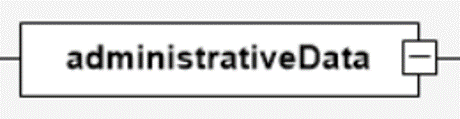 |
| one to unbounded | 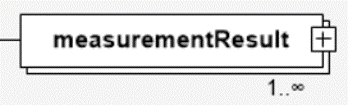 |
| 0 or 1 | 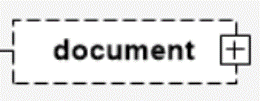 |
¶ Child elements
If an element has child elements, there is a button on the right side with a "+". If you click on the "+" button, you will see the elements of the next level.
| Child elements | Graphic |
|---|---|
| collapsed | 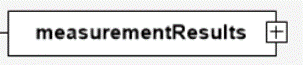 |
| expanded |  |
| Element without children | 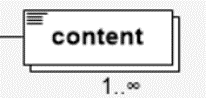 |
¶ Arrangement and selection of child elements
For some elements the order is obligatory for some not, in the following table there ist an overview of the corresponding graphics.
| Order of elements | Graphic |
|---|---|
| The child elements can be arranged in any order. | 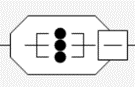 |
| The child elements must be arranged in a specified order. | 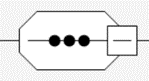 |
| Exactly one child element must be selected. | 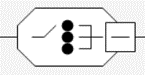 |
| Recursively called elements, here as an example the element dcc:hash - are displayed as follows | 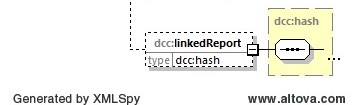 |
1: XSD Diagram is a free xml schema definition diagram viewer (http://regis.cosnier.free.fr). Version 1.2 Copyright (c) 2006-2018 Regis Cosnier, All Rights Reserved. This program is free software and may be distributed according to the terms of the GNU General Public License (GPL). ↩︎
2: XMLSpy Version 2018 of the company Altova GmbH, Rudolfsplatz 13a/9, A-1010 Wien https://www.altova.com/de/xmlspy-xml-editor ↩︎